The About excerpt that appears on your Home page in the left column under your three featured blog posts can be edited on your “About” page in the Excerpt field.

Find the Excerpt Box
 Click on the “About” page in your dashboard to edit the page.
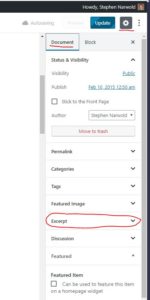
If you’re using the Gutenberg (or “Block”) editor, look in the right column (if there’s no right column, click the gear icon to reveal it), under the “Document” tab, for the “Excerpt” heading (see image to the right).
If you’re using the Classic Editor, scroll down below the text body (and “Revisions” if you are showing them.)

After you have edited the Excerpt field, be sure to scroll back up and click “Update” in the right sidebar to save your changes before leaving the page.
(*If you’re not seeing the Excerpt field, look in “Screen Options” in the top right corner of your screen. Or, if you’re using the Gutenberg editor, click the three dots in the top right corner and select “options” from the drop-down menu. In either case, Make sure the Excerpt box is checked)

Leave a Reply