Posts are the entries that display from newest to oldest on your Blog Home page. Posts are your main tool for communicating with your blog visitors.
To write a post:
- Log in to your WordPress dashboard. (https://blogs.ethnos360.org/wp-admin)
- Click the left-hand Posts tab.
- Click the Add New Sub Tab
- This will be the most confusing part if you’ve never used WordPress to write a post before. When you first open the new post screen, there are several “Meta Boxes” that are open and take up most of the screen, even though they are only supposed to be there for “extra stuff”. For each meta box (one should be called AIOSEO Settings), look all the way to the right side to find the little up-facing triangle.
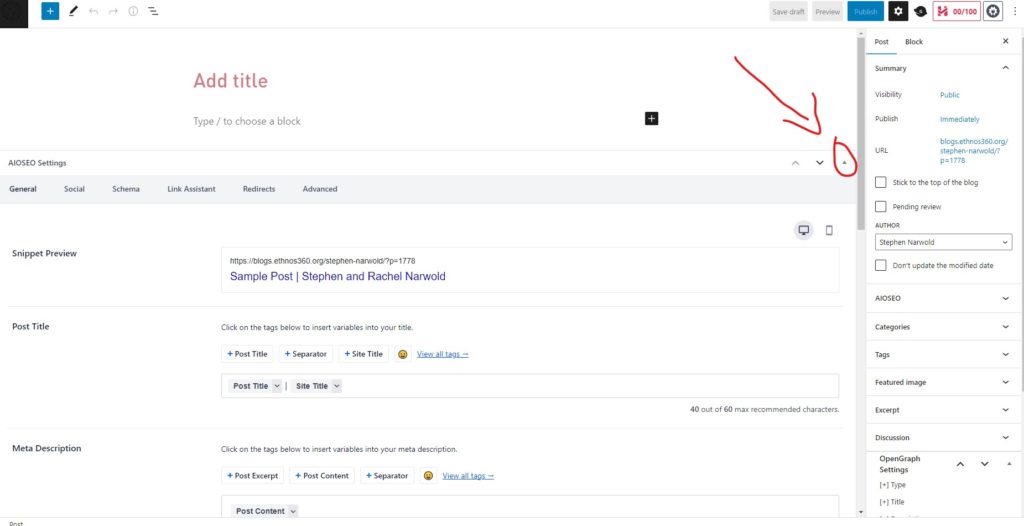
- Clicking that triangle will minimize that mate box, and then you’ll see the next one. Keep minimizing all these meta boxes until they line up nicely at the bottom of the screen and out of the way.
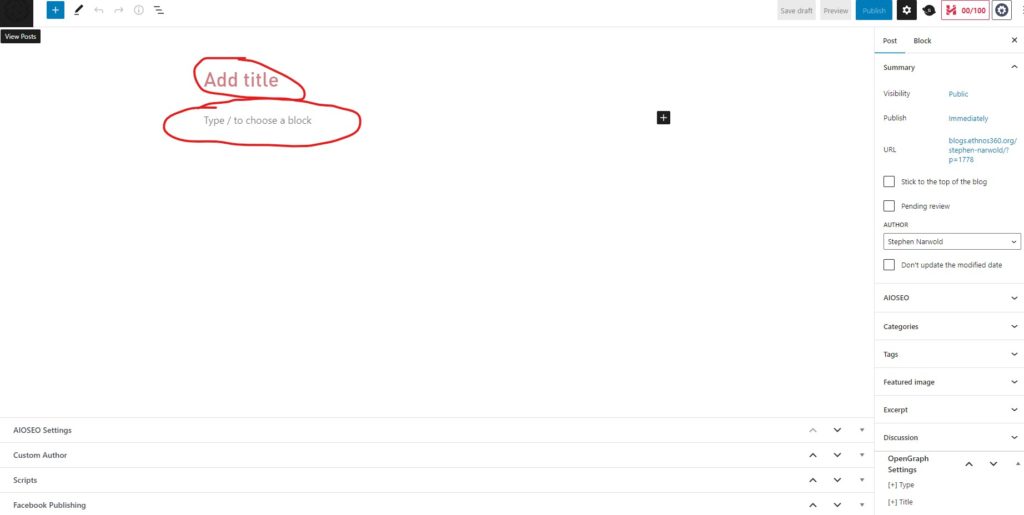
- Now it’s a lot easier to see where the title and body of your post will go.
- One good photo at the top of your post is recommended. Use the blue “+” button in the top left to add a new block. Just select the image block and follow the instructions.
- If you need to stop before your post is completed, use Save Draft to store your post.
- If you would like to see how your post will appear to blog visitors, use Preview. Your preview will appear in another tab or window.
- When you are ready, click Publish.
For more details on using the post editor (also called the “Gutenberg Editor”), Here is a good beginner’s article on how to use it.
Leave a Reply